What Is Assistive Technology in Special Education? Complete 2026 Guide
What Is Assistive Technology in Special Education? Complete 2026 Guide
Assistive technology (AT) has revolutionized special education, transforming how students with disabilities access learning, communicate, and achieve academic success. According to the National Center for Education Statistics, approximately 7.3 million students—or 15% of all public school students—received special education services under IDEA in the 2022-2023 school year. For many of these students, assistive technology serves as the bridge between their abilities and academic achievement.
This comprehensive guide explores everything educators, parents, and students need to know about assistive technology in special education—from legal requirements and assessment frameworks to practical implementation strategies and emerging innovations. Understanding why education is important is crucial for creating truly inclusive educational environments that serve all learners.
Understanding Assistive Technology: Definition and Legal Framework
What Is Assistive Technology?
The Individuals with Disabilities Education Act (IDEA) defines assistive technology as "any item, piece of equipment, or product system, whether acquired commercially off the shelf, modified, or customized, that is used to increase, maintain, or improve the functional capabilities of a child with a disability." This broad definition encompasses everything from simple, low-tech solutions like pencil grips and highlighted paper to sophisticated computer-based systems and communication devices.
The key element in this definition is function—AT exists to help students accomplish tasks that would otherwise be difficult or impossible. This functional focus means that the same device might be assistive technology for one student but not for another, depending on individual needs and circumstances.
IDEA Requirements for Assistive Technology
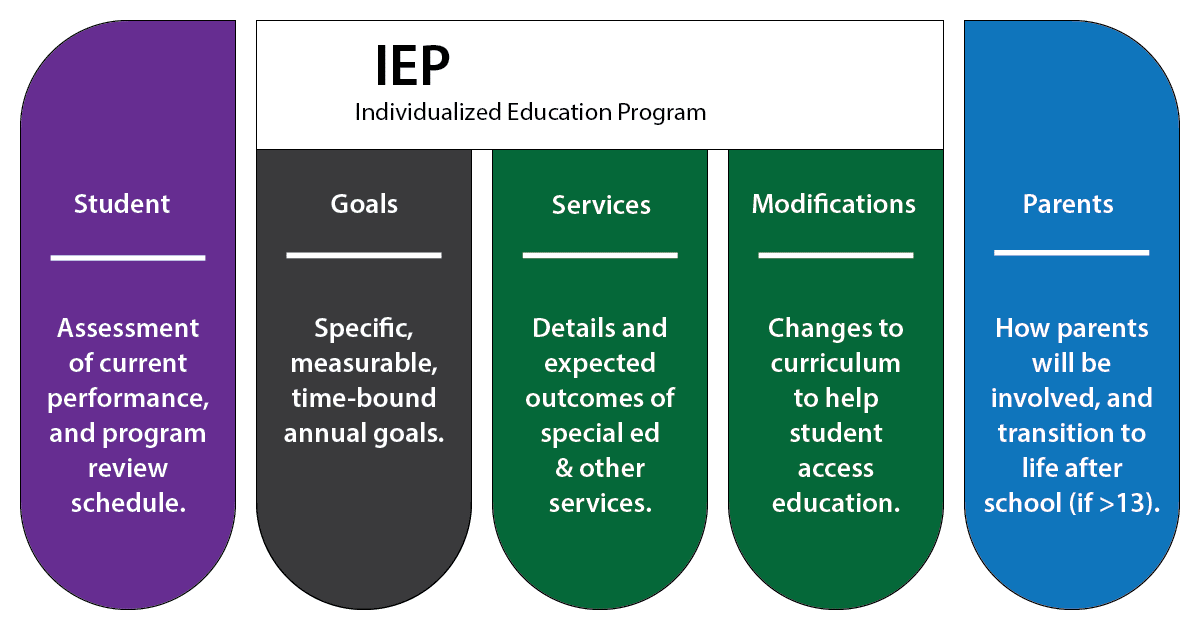
Under IDEA, schools must consider assistive technology for every student with an Individualized Education Program (IEP). This isn't optional—it's a legal requirement. The IEP team must:
- Consider whether the student needs AT devices and services to receive FAPE (Free Appropriate Public Education)
- Conduct AT assessments when needed
- Provide AT at no cost to families if determined necessary for FAPE
- Include AT in the IEP when appropriate
- Ensure AT is available for home use if needed for FAPE
Learn more about what special education teachers do and how they implement AT in the classroom.
◆"Assistive technology is not about the disability—it's about the task. We need to ask: What does this student need to do, and what's preventing them from doing it? That's where AT solutions begin."> — Dr. Joy Zabala, Creator of the SETT Framework
The Assistive Technology Continuum: From Low-Tech to High-Tech
Assistive technology exists along a continuum from simple, inexpensive solutions to complex, specialized devices. Understanding this continuum helps educators and families select appropriate tools without defaulting to expensive options when simpler solutions might work better.
| Category | Description | Examples | Cost Range |
|---|---|---|---|
| No-Tech | Strategies and accommodations requiring no equipment | Preferential seating, extended time, verbal instructions, peer support | Free |
| Low-Tech | Simple, inexpensive tools without batteries or electronics | Pencil grips, slant boards, highlighted paper, picture schedules, communication boards | $1-$50 |
| Mid-Tech | Battery-operated or simple electronic devices | Audio recorders, talking calculators, electronic spellers, simple voice output devices | $50-$500 |
| High-Tech | Complex electronic systems, often computer-based | Speech-generating devices, screen readers, eye-gaze systems, specialized software | $500-$15,000+ |
The most effective AT solution isn't always the most sophisticated one. Learning how to study effectively combined with the right AT tools can help students achieve their full potential.
Categories of Assistive Technology in Special Education
1. Communication and Language
Augmentative and Alternative Communication (AAC) devices help students who have difficulty with verbal speech express themselves. These range from simple picture boards to sophisticated speech-generating devices (SGDs).
Common AAC Tools:
- Picture Exchange Communication System (PECS): Uses pictures to help non-verbal students initiate communication
- Speech-Generating Devices: Devices like Proloquo2Go, TouchChat, and LAMP that produce spoken output
- Communication Boards: Low-tech boards with symbols, words, or pictures for pointing
- Eye-Gaze Technology: Allows communication through eye movement for students with severe motor impairments
2. Reading and Writing Support
For students with learning disabilities like dyslexia or dysgraphia, AT can transform the reading and writing experience. These tools don't replace learning—they remove barriers so learning can occur.
Reading AT:
- Text-to-Speech (TTS): Software like NaturalReader, Read&Write, and built-in device features that read digital text aloud
- Screen Readers: JAWS, NVDA, and VoiceOver for students with visual impairments
- Digital Books: Bookshare and Learning Ally provide accessible formats for students with print disabilities
- Optical Character Recognition (OCR): Converts printed text to digital format for TTS access
Writing AT:
- Speech-to-Text: Dragon NaturallySpeaking, Google Voice Typing, and built-in dictation features
- Word Prediction: Co:Writer, WordQ, and built-in prediction that suggests words as students type
- Graphic Organizers: Inspiration, Kidspiration, and mind-mapping tools for organizing thoughts
- Alternative Keyboards: Large-key, colored, or customized keyboards for students with motor difficulties
3. Mathematics Support
Math-related AT helps students with dyscalculia, visual processing difficulties, and other challenges that affect mathematical learning. Our guide on how to score 100 marks in maths offers additional strategies.
- Talking Calculators: Provide auditory feedback for students who may misread numbers
- Math Notation Software: EquatIO, MathType, and MathTalk help students create and solve equations
- Virtual Manipulatives: Digital versions of physical math tools for conceptual understanding
- Graph Paper Software: Digital graph paper that helps with number alignment
Students can also use our free basic calculator and percentage calculator for mathematical support.
4. Sensory and Physical Access
Students with visual, hearing, or physical impairments need specialized AT to access educational content and participate in learning activities.
| Need Area | AT Solutions | Key Benefits |
|---|---|---|
| Visual Impairment | Screen magnification, Braille displays, screen readers, audio description | Access to digital and print materials, independence in navigation |
| Hearing Impairment | FM systems, captioning, visual alerts, hearing loops | Access to auditory information, classroom participation |
| Motor Impairment | Alternative mice, switch access, eye-gaze control, voice control | Computer access, written expression, environmental control |
| Multiple Disabilities | Multi-modal systems, customized solutions, integrated platforms | Comprehensive access, individualized support |
5. Organization and Executive Function
Students with ADHD, autism, and other conditions affecting executive function benefit from AT that supports planning, time management, and organization. Learning how to improve concentration is another key strategy for these students.
- Visual Timers: Time Timer and similar tools that show time passage visually
- Task Management Apps: Todoist, Any.do, and specialized apps like Choiceworks
- Digital Calendars: With reminders and color-coding for different activities
- Note-Taking Tools: Audio recording apps, smart pens like Livescribe, and note organization apps
◆"The goal of assistive technology isn't to make students dependent on tools—it's to level the playing field so they can demonstrate their true capabilities and develop independence over time."> — Dr. Dave Edyburn, Professor of Special Education Technology, University of Central Florida
The SETT Framework: A Model for AT Decision-Making
The SETT Framework, developed by Dr. Joy Zabala, provides a systematic approach to AT assessment and selection. SETT stands for Student, Environments, Tasks, and Tools—and critically, they must be considered in that order.
Student
Begin by understanding the student's:
- Current abilities and strengths
- Areas of difficulty or concern
- Previous AT experience
- Interests and preferences
- Learning style and communication methods
Environments
Consider all settings where AT will be used:
- General education classroom
- Special education settings
- Home environment
- Community settings
- Physical layout and accessibility
Tasks
Identify specific tasks the student needs to accomplish:
- Academic tasks (reading, writing, math)
- Communication needs
- Social participation
- Daily living activities at school
Tools
Only after thoroughly examining the first three elements should tools be considered.
Funding Sources for Assistive Technology
While schools must provide AT at no cost if determined necessary for FAPE, families may also explore additional funding sources. Understanding the average cost of college can help families plan for AT expenses in higher education.
| Funding Source | What It Covers | How to Access |
|---|---|---|
| School District (IDEA) | AT needed for FAPE as determined by IEP team | Request AT consideration in IEP meeting |
| Medicaid/Insurance | Medically necessary equipment (AAC devices, hearing aids) | Work with healthcare provider for prescription |
| State AT Programs | Device loans, demonstrations, low-interest financing | Contact state AT program (every state has one) |
| Non-Profit Organizations | Grants for specific disabilities or technologies | Research disability-specific organizations |
Assistive Technology for Specific Disabilities
Autism Spectrum Disorder (ASD)
Students with autism often benefit from AT that supports communication, social skills, and sensory regulation:
- Visual Schedules and Timers: Apps like Choiceworks, First Then Visual Schedule
- Social Stories Apps: Social Stories Creator, Pictello
- AAC for Non-Verbal Students: Proloquo2Go, LAMP Words for Life
- Sensory Tools: Noise-canceling headphones, fidget tools, sensory apps
Learning Disabilities
Students with dyslexia, dysgraphia, dyscalculia, and other learning disabilities benefit from AT that provides alternative pathways to learning:
- For Dyslexia: Learning Ally audiobooks, text-to-speech, colored overlays, OpenDyslexic font
- For Dysgraphia: Speech-to-text, word prediction, typing instead of handwriting
- For Dyscalculia: Talking calculators, math apps with visual supports
Students can also benefit from studying smarter, not harder strategies combined with appropriate AT.
ADHD
AT for students with ADHD focuses on executive function support:
- Focus Tools: Website blockers, focus apps, noise-canceling headphones
- Organization: Digital planners, reminder apps, color-coding systems
- Time Management: Visual timers, time-blocking apps, break reminders
- Note-Taking: Audio recording apps, smart pens, structured note templates
Emerging Technologies in Special Education
The AT landscape is rapidly evolving, with new technologies offering exciting possibilities. Read about the future of education to understand how technology is transforming learning for all students.
Artificial Intelligence and Machine Learning
AI is transforming AT capabilities:
- Intelligent Text-to-Speech: More natural-sounding voices with emotional intonation
- Predictive Text: Context-aware suggestions that learn individual patterns
- Real-Time Captioning: AI-powered transcription for deaf and hard-of-hearing students
- Image Description: Automatic alt-text generation for visual content
Our AI study guide maker is an example of how AI can support learning for all students.
◆"We're moving from a world where assistive technology is a specialized add-on to one where accessibility is built into mainstream technology. This benefits everyone, not just students with identified disabilities."> — Dr. Marshall Raskind, Learning Disabilities Researcher
Best Practices for AT Implementation
1. Start with Assessment, Not Technology
Effective AT implementation begins with thorough assessment using frameworks like SETT. Rushing to a technology solution without understanding the student's needs often leads to abandonment.
2. Involve the Student
Students should be active participants in AT selection when possible. Their preferences, concerns about stigma, and input on usability matter.
3. Provide Adequate Training
Everyone who works with the student needs training—not just the student themselves. This includes special education teachers, general education teachers, paraprofessionals, and family members.
4. Allow Trial Periods
Before committing to expensive AT, trial periods allow teams to evaluate effectiveness. State AT programs often provide loaner devices for this purpose.
5. Plan for Transitions
AT needs change as students move between grades, schools, and eventually to post-secondary education. Planning should include how AT will transfer between settings.
Resources for Parents and Educators
Access additional educational resources on TheTutorBridge:
- Study resources for Class 6-12
- Free calculators and tools
- Educational blog articles
- Motivation with positive quotes for students
Frequently Asked Questions
Does my child have to be diagnosed with a disability to use AT?
Schools must provide AT to students with IEPs or 504 plans if needed for educational access. However, many AT tools are freely available and can be used by anyone.
Will using AT make my child dependent on technology?
Research consistently shows that appropriate AT use doesn't create dependency—it enables learning and often supports skill development.
Can schools refuse to provide AT due to cost?
No. Under IDEA, if the IEP team determines AT is necessary for FAPE, the school must provide it regardless of cost.
What happens to AT when my child changes schools?
AT requirements in the IEP must be implemented at the new school. The new school may provide different devices that accomplish the same purpose, but they must ensure continued access.
Can my child use AT on standardized tests?
If AT is documented in the IEP or 504 plan and used regularly in instruction, it typically can be used on standardized tests. Check with your state education department for details.
How often should AT be evaluated?
AT should be reviewed at least annually during IEP meetings, but more frequent evaluation may be needed when current AT isn't meeting needs or the student's needs change.
Conclusion: Technology as a Bridge to Potential
Assistive technology in special education isn't about replacing human support or creating technological dependency—it's about removing barriers so students can demonstrate their true capabilities. When implemented thoughtfully, AT empowers students with disabilities to access learning, express themselves, and build the skills they need for academic success and independence.
The key to successful AT implementation lies in:
- Starting with thorough assessment focused on the student, not the technology
- Involving students in selection and building buy-in
- Providing adequate training for everyone involved
- Monitoring effectiveness and adjusting as needed
- Planning for transitions and long-term success
For personalized educational support, book a demo class with TheTutorBridge to see how we can help your child reach their full potential.